Lincoln Aviator: All-Wheel Drive / Driving on Snow and Ice
WARNING: If you are driving in slippery conditions that require tire chains or cables, then it is critical that you drive cautiously. Keep speeds down, allow for longer stopping distances and avoid aggressive steering to reduce the chances of a loss of vehicle control which can lead to serious injury or death. If the rear end of your vehicle slides while cornering, steer in the direction of the slide until you regain control of your vehicle.
Note: Excessive tire slippage can cause driveline damage.
AWD vehicles have advantages over 2WD vehicles in snow and ice but can skid like any other vehicle.
Should you start to slide while driving on snowy or icy roads, turn the steering wheel in the direction of the slide until you regain control.
Avoid sudden applications of power and quick changes of direction on snow and ice. Apply the accelerator slowly and steadily when starting from a full stop.
Avoid sudden braking as well. Although an AWD vehicle could accelerate better than a two-wheel drive vehicle in snow and ice, it will not stop any faster, because as in other vehicles, braking occurs at all four wheels. Do not become overconfident as to road conditions.
Make sure you allow sufficient distance between you and other vehicles for stopping. Drive slower than usual and consider using one of the lower gears. In emergency stopping situations, apply the brake steadily. Since your vehicle is equipped with a four wheel (ABS), do not “pump” the brakes.
 Driving in Special Conditions With All-Wheel Drive (AWD)
Note: Use of the AWD system in slippery,
deep snow and sand drive modes on dry
surfaces could produce some vibration and
driveline bind up and, or excessive tire wear,
as the intent of these drive modes are for
slippery and loose surfaces...
 Maintenance and Modifications
The suspension and steering systems on
your vehicle have been designed and tested
to provide predictable performance whether
loaded or empty and durable load carrying
capability...
Other information:
Lincoln Aviator 2020-2026 Service Manual: Diagnosis and Testing - Perimeter Anti-Theft Alarm
Diagnostic Trouble Code (DTC) Chart Diagnostics in this manual assume a certain skill level and knowledge of Ford-specific diagnostic practices. REFER to: Diagnostic Methods (100-00 General Information, Description and Operation). Diagnostic Trouble Code Chart Module DTC Description Action BCM B109F:01 Intrusion Sensor Module: General Electrical Failure GO to Pinpoint Test B BCM B109F:02 Intrusion Sensor Module: General Signal Failure GO to Pinpoint Test B BCM B109F:08 Intrusion Sensor Module: Bus Signal / Message Failure GO to Pinpoint Test B BCM B109F:49 Intrusion Sensor Module: Internal Electric Failure GO to Pinpoint Test E BCM B109F:55 Intrusion Sensor Module: Not Configured GO to Pinpoint Test F BCM B109F:97 Intrusion Sensor Module: Component or System Operation Obstructed or Blocked GO to Pinpoint Test B BCM B109F:9A Intrusion Sensor Module: Component or System Operating Conditions GO to Pinpoint Test B BCM B1305:01 Hood Switch: General Electrical Failure GO to Pinpoint Test D BCM B1305:11 Hood Switch: Circuit Short To Ground GO to Pinpoint Test D BCM B1305:15 Hood Switch: Circuit Short To Battery or Open GO to Pinpoint Test D Symptom Chart Symptom Chart: Anti-Theft - Perimeter Diagnostics in this manual assume a certain skill level and knowledge of Ford-specific diagnostic practices...
Lincoln Aviator 2020-2026 Owners Manual: Using the Pre-Collision Assist System
The system is active at speeds above approximately 3 mph (5 km/h) and pedestrian detection is active at speeds up to 50 mph (80 km/h). If your vehicle is rapidly approaching another stationary vehicle, a vehicle traveling in the same direction as yours, or a pedestrian within your driving path, the system is designed to provide three levels of functionality: Alert Brake Support Active Braking Alert: When active, a flashing visual warning appears and an audible warning tone sounds...
Categories
- Manuals Home
- Lincoln Aviator Owners Manual
- Lincoln Aviator Service Manual
- Changing the Front Wiper Blades - Vehicles With: Heated Wiper Blades
- Body and Paint
- General Procedures - Transmission Fluid Drain and Refill
- New on site
- Most important about car
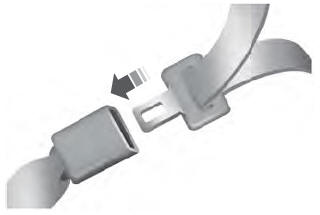
Fastening the Seatbelts
The front outboard and rear safety restraints in the vehicle are combination lap and shoulder belts.
Insert the belt tongue into the proper buckle (the buckle closest to the direction the tongue is coming from) until you hear a snap and feel it latch. Make sure that you securely fasten the tongue in the buckle.