Lincoln Aviator: Navigation (If Equipped) / SiriusXM Traffic and Travel Link (If Equipped)
SiriusXM Traffic and Travel Link is available on vehicles equipped with navigation and only in select markets. You must activate and subscribe to receive SiriusXM Traffic and Travel Link information. It helps you locate the best gas prices, find movie listings, get current traffic alerts, view the weather map, get accurate ski conditions and see current sports scores.
The system calculates a reasonable efficient route based on available speed limits, traffic, and road conditions. You may know a local short cut that is more efficient at a given time than the route provided by SYNC 3, but you should expect a slight difference in minutes or miles with the SYNC 3 route.
 Route Guidance
Turn indicator. Select to hear the
last voice prompt.
Point of interest.
Estimated time of arrival, distance
to destination or time to
destination...
 Michelin Travel Guide (If Equipped)
The Michelin travel guide is a service which
provides additional information about certain
places of interest, for example restaurants,
hotels and tourist sites...
Other information:
Lincoln Aviator 2020-2026 Service Manual: Removal and Installation - Radiator
Removal NOTE: Removal steps in this procedure may contain installation details. Remove the cooling module. Refer to: Cooling Module (303-03A Engine Cooling - 3.0L EcoBoost, Removal and Installation). Remove the bolt, release the tabs and remove the A/C condenser...
Lincoln Aviator 2020-2026 Service Manual: Description and Operation - Head Up Display (HUD) - System Operation and Component Description
System Operation System Diagram Item Description 1 BCM 2 GWM 3 SODR 4 SODL 5 DSM 6 PCM 7 HVAC module 8 RH steering wheel switch 9 HUD module 10 Rain sensor 11 IPC 12 ACM 13 Displays 14 Adaptive cruise control 15 DTE/Low fuel indication 16 Forward collision warning 17 Clock/outside air temperature 18 Electric Vehicle (EV) range indication 19 Active driver assist system display 20 Digital speedometer/speed sign display 21 BLIS 22 LH 23 RH 24 Turn indicators 25 Navigation 26 APIM 27 SCCM 28 IPMA 29 SIMA Network Message Chart Module Network Input Messages - HUD Module Broadcast Message Originating Module Message Purpose Adaptive cruise control follow mode display IPMA Input used to control the ACC component in the active driver assist system display...
Categories
- Manuals Home
- Lincoln Aviator Owners Manual
- Lincoln Aviator Service Manual
- General Procedures - Transmission Fluid Drain and Refill
- Drive Modes
- Fuel Quality
- New on site
- Most important about car
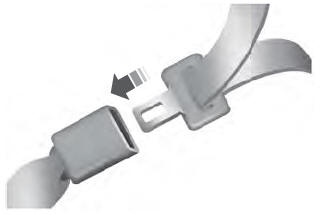
Fastening the Seatbelts
The front outboard and rear safety restraints in the vehicle are combination lap and shoulder belts.
Insert the belt tongue into the proper buckle (the buckle closest to the direction the tongue is coming from) until you hear a snap and feel it latch. Make sure that you securely fasten the tongue in the buckle.