
Lincoln Aviator 2020-2026 Owners Manual / Audio System / General Information
Lincoln Aviator: Audio System / General Information
WARNING: Driving while distracted can result in loss of vehicle control, crash and injury. We strongly recommend that you use extreme caution when using any device that may take your focus off the road. Your primary responsibility is the safe operation of your vehicle. We recommend against the use of any hand-held device while driving and encourage the use of voice-operated systems when possible. Make sure you are aware of all applicable local laws that may affect the use of electronic devices while driving.
Radio Frequencies and Reception Factors
Note: Listening to loud audio for long periods of time could damage your hearing.

 Audio System
..
 Audio Unit
WARNING: Driving while distracted
can result in loss of vehicle control, crash
and injury. We strongly recommend that
you use extreme caution when using any
device that may take your focus off the
road...
Other information:
Lincoln Aviator 2020-2026 Service Manual: Diagnosis and Testing - E Clutch
Symptom Chart E Clutch For E clutch operation, REFER to: E Clutch (307-01A Automatic Transmission - 10-Speed Automatic Transmission – 10R60, Description and Operation). E Clutch Condition Possible Sources Action E clutch does not apply SSE mechanically stuck OFF INSTALL a new solenoid...
Lincoln Aviator 2020-2026 Service Manual: Description and Operation - Collision Warning and Collision Avoidance System - System Operation and Component Description
System Operation ACC With Pre-Collision Assist Item Description 1 HS-CAN1 2 ACM 3 HUD 4 CCM 5 IPC 6 BCM 7 GWM 8 ABS Module 9 IPMA 10 Private CAN 11 HS-CAN2 12 HS-CAN3 Network Message Chart Network Input Messages - ACM Broadcast Message Originating Module Message Purpose IPC chime IPC Data used to command a warning chime during a possible collision event and audio mute so that the warning chime can be heard...
Categories
- Manuals Home
- Lincoln Aviator Owners Manual
- Lincoln Aviator Service Manual
- Tire Change Procedure
- Configuring The Head Up Display
- Wireless Accessory Charger (If Equipped)
- New on site
- Most important about car
Fastening the Seatbelts
The front outboard and rear safety restraints in the vehicle are combination lap and shoulder belts.
Insert the belt tongue into the proper buckle (the buckle closest to the direction the tongue is coming from) until you hear a snap and feel it latch. Make sure that you securely fasten the tongue in the buckle.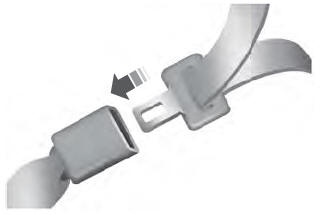

Copyright © 2026 www.liaviator2.com